Companies
Companies are the businesses your contacts work at. The Companies list works just like your Contacts list (search, sort, filter, choose your columns, and page through results), so once you know one, you know both. Admins land on All owners, so every company on the team is in view — switch to Mine to focus on the ones you're responsible for. Active filters are highlighted.
The company page
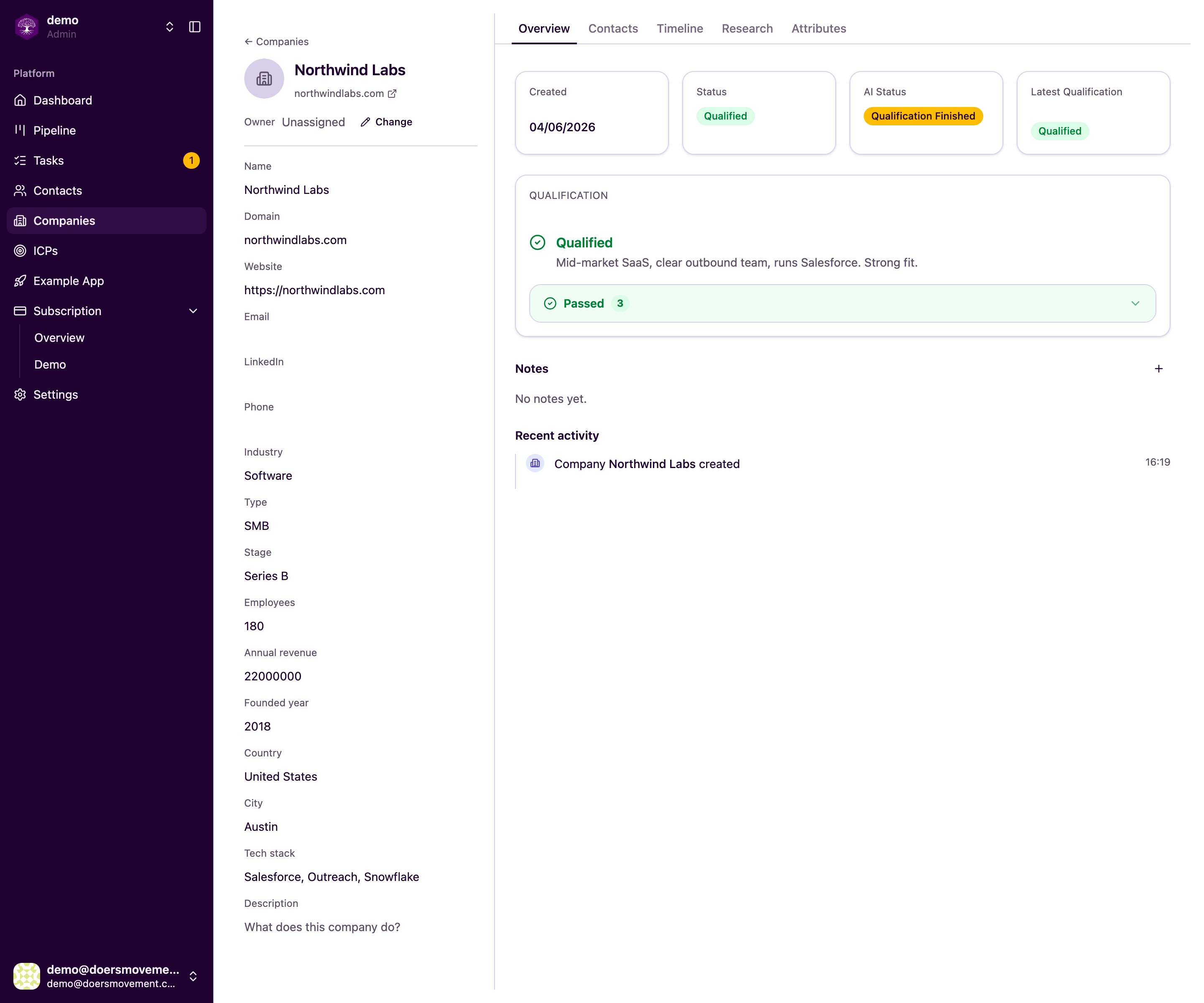
Click a company to open its page. Like a contact, it's organized into tabs:
| Tab | What's there |
|---|---|
| Overview | The key facts about the business and whether it qualifies against your ICP |
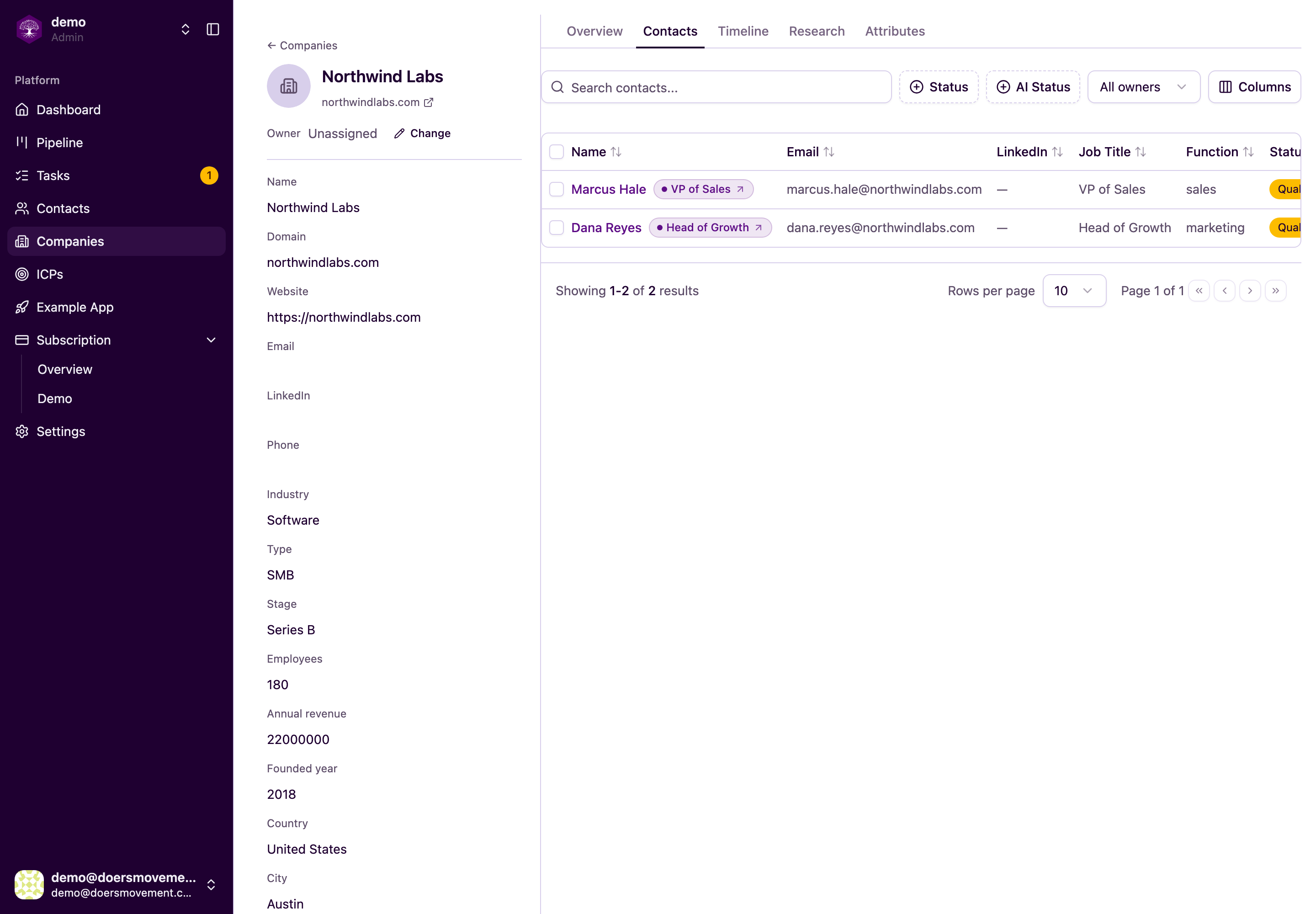
| Contacts | The people you know at this company |
| Timeline | A history of everything that's happened with this company |
| Research | What the AI discovered about the business |
| Details | The AI's structured knowledge about the company (see Attributes) |
The Contacts tab gathers everyone you know at the business in one place.
What you'll see about a company
Doers Movement gathers the details that tell you whether a business is worth your time:
- Industry: the market they're in
- Employees: roughly how big they are
- Revenue: their scale
- Founded year: how established they are
- Location: where they're based
- Type: the kind of business
- Growth stage: how mature they are
- Technology they use: the tools and platforms in their stack
These give you a quick read on whether a company looks like your kind of customer before you spend any effort.
AI work like research and qualification is started from the company's Status control. See Starting AI work.
Qualification at a glance
The company's qualification verdict against your ICP shows right here. It tells you whether the business matches the customer profile you're chasing, and why, so you can prioritize the ones most likely to buy. For how those verdicts are decided, see How Qualification Works.
Companies have an owner, just like contacts. What you can see and do depends on who owns the company. See Ownership and permissions.
Open a company's Contacts tab to see everyone you know there in one place, useful when you're trying to build a case across several people in the same business.
How your AI Agent screens companies
Most of the people in your network who aren't a fit are not a fit because of where they work. So your AI Agent also screens each company: a quick, free check, before you spend anything on full qualification. It looks only at three things: its industry, its number of employees and the country of its headquarters, and compares them with your ICPs.
- Possible Fit: the industry and the size both fit one of your ICPs. These are the companies most likely to qualify, so they're the ones to qualify first.
- Stays in Active, with a reason: the company is clearly outside every ICP, and the list says why: Industry doesn't match, Size outside your ICPs or Outside your geographies. It saves you qualifying a company that won't make it. A country only rules a company out when it's clearly outside every geography your ICP allows. Regions like the European Union or the Nordics count as the countries in them.
- Industry or size unknown: your AI Agent couldn't find these yet, so it doesn't judge. It never calls a company "not a fit" for missing information, and an unknown country never rules a company out either.
- No LinkedIn page: a company with no LinkedIn page, and no industry or size you've given it, isn't screened at all: there's nothing for your AI Agent to go on. Add its LinkedIn page (or its industry and size), or move it to Possible Fit yourself if you know it's a fit.
Each screening that changes something leaves one line on the company's timeline saying what it decided and why, for example "Screening: not a fit. SignalFisher has 67 employees; your ICP allows 2–50."
Filter the Companies list by Screening or Screening reason to work through each group. You can still send any company to To Qualify: if screening ruled it out, you'll see a short note, and the full qualification runs anyway. A company you move to Possible Fit yourself stays there.
When a company is ruled out, the people who work there are marked Company not a fit too, so your contacts list stays honest without extra work. This works even once your free screening or free LinkedIn reads are used up, and it never spends any of them. If the company later becomes a fit (you move it to Possible Fit, or a full qualification says it fits), those people get screened again automatically. A full qualification of the company always has the last word.
The same goes for a company that isn't confirmed yet: while its industry or size is unknown, or it has no LinkedIn page, its people stay in New rather than Possible Fit, even when their role matches. That keeps Possible Fit for people at companies that could actually buy from you. Once the company is a possible fit, its people are screened again on their own.
Screen companies when you want to. Your AI Agent screens new companies on its own, but you don't have to wait. Filter your Companies list to the ones worth a look, tick them (or Select all N matching) and choose Screen. The window shows how many will be screened, which are left out and why, and what it costs. When your AI Agent needs a company's LinkedIn page to know its industry or size, reading it is free while this month's free LinkedIn reads last; after that it costs the same as reading a LinkedIn profile, and the button shows the price before anything starts. Only companies in Active or Possible Fit are screened.
One record per company, and only real companies
Companies arrive from many places: your LinkedIn connections, a spreadsheet, or the AI Agent while it researches. Doers Movement only adds a company it can recognise for sure, and it checks first whether you already have it. That keeps each business's research, qualification and notes on one record, and keeps look-alikes out of your list.
We recognise a company by:
- Its LinkedIn company page. The most reliable sign. Small differences in how the link is written still count as the same page.
- Its website. Used when there's no LinkedIn page.
A name on its own is usually not enough. Lots of different businesses share a name, so a company that comes in from a spreadsheet or from research with only a name isn't added automatically. The person is still saved; they just don't have a company yet.
There is one exception, so the people you want to qualify are never stuck without a company: the employer on someone's LinkedIn profile. When a profile names an employer that has no LinkedIn company page, we add that company by its name, or link the company you already have with exactly that name. The person can then be fully qualified, and qualifying them starts by looking for the company's website and LinkedIn page.
Stand-in employers people put on LinkedIn, like "Stealth Startup", "Self-employed" or "Freelance", are never added. They aren't companies you can sell to.
Want the company added? Give us its website or LinkedIn company page: add a website column to your spreadsheet, or tell the AI Agent where to find it. You can also add a company yourself at any time, even with just a name: from the Companies list, or by typing it on a contact.
Next
- The Pipeline: move deals through your sales stages
- How Qualification Works: how verdicts are decided
- Starting AI work: research and qualify from the Status control
- Attributes: the structured knowledge behind the Details tab